HitMyNeed
3.5" USB Type-C IPS PC Hardware Monitoring Screen
3.5" USB Type-C IPS PC Hardware Monitoring Screen
Couldn't load pickup availability
Always See Your PC's Key Stats at a Glance
This 3.5 inch IPS Type-C secondary screen is designed to give you clear, real-time visibility of your computer's vital information without cluttering your main display. The compact 320×480 IPS panel (50 × 74 mm display area) delivers sharp, wide-angle viewing so CPU load, GPU status, RAM usage, temperatures and other metrics remain easy to read from almost any position on your desk.
The monitor connects via a single USB Type-C cable (Type-C to the screen, USB to your PC) for both power and data, so there is no HDMI connection or extra power adapter required. A metal housing with back cover protects the display, while the included bracket and double-sided tape offer flexible mounting on or near your case or monitor. Brightness can be adjusted steplessly for comfortable viewing, and the screen automatically powers off when the PC shuts down.
Why It's a Smart Choice
- Dedicated system monitoring - Shows hardware statistics and system info on a separate display, keeping your main screen free for work or gaming.
- Simple USB setup - Plug into any USB 1.0/2.0/3.0 port, run the included Windows software, and start monitoring with one-click operation.
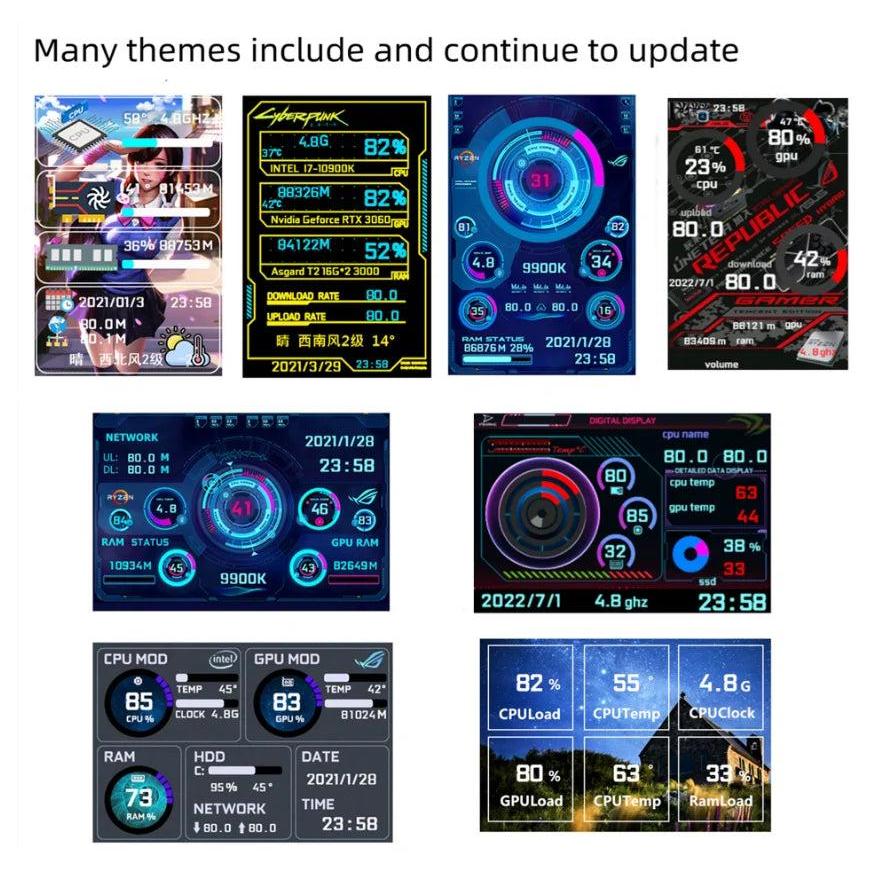
- Customizable display - Supports horizontal/vertical orientation, 360° rotation, theme switching, background image changes, brightness control and optional auto-start at boot.
FAQ
Q: Which operating systems are supported?
A: This secondary screen supports Windows only. It uses dedicated companion software and does not require AIDA64.
Q: How do I set it up?
A: Connect the Type-C cable to the screen and the USB end to your PC, install and start the provided software, then choose your layout, theme and brightness. No additional drivers or complex configuration are needed.
Q: Can it display custom content or other applications?
A: No. It is designed to display the data and layouts provided by the included software only, focused on system monitoring.
Q: Why doesn't my GPU data change on a laptop?
A: Many laptops keep the dedicated GPU idle to save power and use the integrated graphics instead. In that case, the monitored GPU values may remain static because the discrete GPU is not active.
Q: What is included in the package?
A: 1 × 3.5 inch IPS display, 1 × USB Type-C cable (approx. 1 m), 1 × bracket, 1 × double-sided tape.